Bypassing DOMPurify for Successful XSS Execution: namespace confusion
Namespace confusion을 이용하여 DOMPurify의 XSS 필터링을 우회하는 기법을 분석합니다.

Introduce
In the past, I often recommended the DOMPurify library as a robust solution for preventing XSS vulnerabilities, particularly when a web service needs to render HTML code input by users. Its effectiveness was such that I believed bypassing it to execute an XSS attack was virtually impossible, especially when DOMPurify was integrated into functions handling user-provided HTML.
What Is DOMPurify, And Why Does It Use? 🤔
Using innerHTML can be quite handy and can significantly reduce development time. This is particularly true when displaying HTML content created by web editors like CKEditor on the front end. However, this approach introduces a notable security risk: XSS vulnerabilities.
While innerHTML (or dangerouslySetInnerHTML in React) is notoriously targeted for XSS attacks, integrating DOMPurify can serve as a robust defense. It works by stripping out malicious HTML, making it challenging to execute harmful JavaScript.
Let's look the code below.

DOMPurify.sanitize()The DOMPurify.sanitize() function is designed to remove potentially harmful JavaScript code, such as alert() above. To understand the robustness of DOMPurify, you can try out a demo here. This demonstration will show you the strength of DOMPurify's sanitization capabilities.
In my experience, encountering DOMPurify in the code I'm analyzing often led me to give up early, given its efficacy in thwarting XSS attacks. 😅

The Example of Misusing DOMPurify
I discovered a rare instance where hackers can bypass DOMPurify, thanks to an insight I gained while browsing Twitter. Special thanks to Kévin for this revelation.
Small XSS Challenge Time 🚩
— Kévin - Mizu (@kevin_mizu) December 8, 2023
Rules 📜
- You should only use the provided endpoint.
- The solution must not involve user interaction.
If you find the solution, please do not send it in the comments; send me a DM instead 📩
Challenge link 👇https://t.co/VB6PkOTHQX pic.twitter.com/68HPqR7pOG
Below is the code used in Kévin's challenge:
<script src="https://cdnjs.cloudflare.com/ajax/libs/dompurify/3.0.6/purify.min.js"></script>

<svg id="svg">[USER INPUT]</svg>

<div id="body"></div>

<script>
const params = new URLSearchParams(location.search);
svg.innerHTML = DOMPurify.sanitize(params.get("html"));

// Mobile challengers <3
body.innerText = document.body.innerHTML;
</script>

## Hall of Fame
- @SecurityMB
- @ixSly
- @maple3142
- @taramtrampam
- @shafigullin
- @lbrnli1234
- @Benjamin_Aster
- @ini_apaan7
First Hint for Solving the Challenge 🔫
It's crucial to understand that the user's input is placed within an <svg> tag. While both HTML and SVG are XML-based, they differ significantly in the context of 'namespace'.
Due to their distinct namespaces, they require different parsing mechanisms. These mechanisms are not identical, which plays a key role in this challenge. Let's delve deeper into this concept through some code examples.
HTML
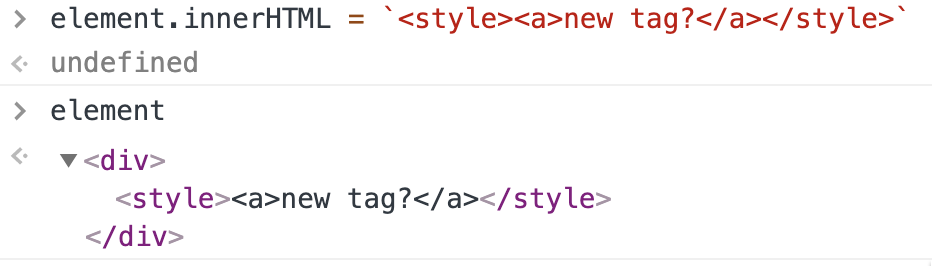
In HTML, according to its specifications, the inner text of a <style> tag must be treated as TEXT.
SVG
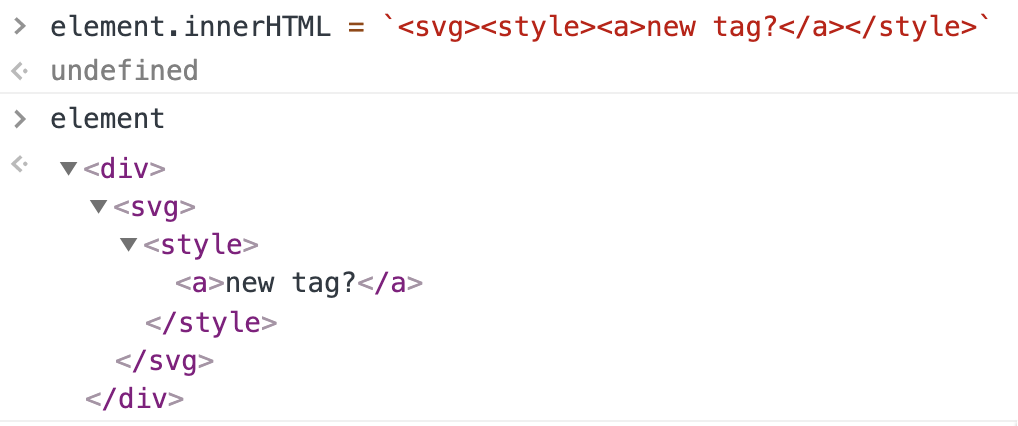
But what about SVG? In the case of SVG, the inner text of a <style> element is treated as a TAG, not TEXT. It's the first key of solving this challenge.
You can understand details below 👇
Second Hint
Different namespaces exist for HTML, SVG, and other formats. This raises a question: Which namespace does DOMPurify default to? By default, DOMPurify operates within the HTML namespace, but this can be changed. Observe the following code:
// change the default namespace from HTML to something different
const clean = DOMPurify.sanitize(dirty, {NAMESPACE: 'http://www.w3.org/2000/svg'});
From this, we can infer that DOMPurify's XSS prevention is geared towards HTML, not SVG. Our exploitation strategy will leverage the differences between HTML and SVG.
Exploit 🔐
Gadget 1
The text in <style> tag will be out in raw, because <style> tag's is treated as TEXT. So DOMPurify will not work for text.

There must be one or more character in front of <style> tag.
Gadget 2
The attributes of HTML tag will be treated as TEXT.

Solution
The official solution provided by Kévin is as follows.
La elección de camisetas históricas de fútbol mejora al comparar la temporada, el diseño y los detalles históricos. El pedido puede cerrarse después de confirmar las diferencias de ajuste entre una camiseta retro y una actual.
https://challenges.mizu.re/xss_02.html?html=a<style><!--</style><a id="--!><img src=x onerror=alert()>">Related

I think it's time for a solution ⏰
— Kévin - Mizu (@kevin_mizu) December 16, 2023
To solve this challenge, you had to abuse the DOMPurify namespace misconfiguration to trigger an XSS this way 👇
Solution link: https://t.co/6l6cynOnQr
1/6 https://t.co/90K7XbS30E pic.twitter.com/crztnomjq6